
Download Interior Decorator AI – AI‑Powered Design Tool for Home & Commercial Spaces
Why Interior Decorator AI is Changing the Way We Design Spaces
Artificial intelligence has moved from being a futuristic concept to a practical engine that powers everyday creativity. Interior Decorator AI sits at the heart of this transformation, offering a cloud‑based design platform that brings professional‑grade visualisation to anyone with an internet connection. Whether you’re a veteran architect juggling multiple client briefs, a freelance interior stylist looking for a faster way to generate mood boards, or a homeowner who simply wants to experiment with paint colours and furniture layouts, this tool removes the technical barriers that traditionally separate designers from their ideas.
The core promise of Interior Decorator AI is both simple and ambitious: generate photorealistic interior and exterior renders in seconds, edit those renders with a suite of AI‑driven tools, and collaborate with teammates or clients in real time—all without downloading bulky software. By consolidating image generation, background removal, texture swapping, and video walkthrough creation into a single browser interface, the platform eliminates the need to switch between Photoshop, Blender, and video editors, dramatically shortening project timelines and reducing licensing costs.
Beyond speed, the platform’s multilingual interface and cloud‑first architecture make it accessible to design teams spread across continents. The AI models have been trained on millions of design images, meaning they understand a wide range of styles—from mid‑century modern to industrial loft—and can adapt to nuanced prompts that include material specifications, lighting conditions, and spatial constraints. This level of contextual awareness empowers users to explore a virtually unlimited design space without needing to master complex 3D modelling software.
In this review we’ll explore the platform’s key capabilities, walk through the onboarding and usage experience, evaluate system compatibility, and weigh the advantages and drawbacks based on hands‑on testing. By the end, you’ll have a clear understanding of whether Interior Decorator AI deserves a spot in your creative workflow and how to make the most of its AI‑enhanced features.
Overview: What Interior Decorator AI Offers and Who It Serves
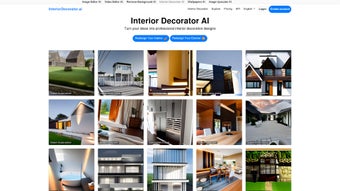
Interior Decorator AI is a fully cloud‑hosted design assistant that leverages deep‑learning models to turn simple text prompts or uploaded photographs into high‑resolution interior and exterior visualisations. Users can input room dimensions, desired colour palettes, furniture styles, and lighting scenarios, and the AI instantly renders a realistic image that reflects those parameters. The platform goes beyond static imagery by providing a Video Editor AI that automatically creates smooth walkthrough videos, and a Remove Background AI that isolates objects for further manipulation or presentation.
From a business perspective, the service operates on a subscription model with two main tiers: PRO for solo creators and PRO for Teams for collaborative environments. Both tiers grant unlimited image generation, priority processing, and up to 4K output resolution. The Team tier adds role‑based permissions, shared asset libraries, and a commercial usage license that allows agencies to sell generated designs without worrying about copyright claims. This structure makes the tool flexible for a wide audience—from independent designers who need occasional inspiration to large firms that require a secure, scalable workflow.
Compatibility is a standout feature. Because Interior Decorator AI runs entirely in the browser, it works on any modern operating system that supports Chrome, Edge, Safari, or Firefox. This includes Windows 10/11, macOS Monterey and later, and most recent Linux distributions. Mobile users on Android 12+ or iOS 15+ can also access the platform, though the full suite of editing tools is best experienced on a desktop with a larger screen and a stable broadband connection.
Security and privacy are handled with industry‑standard HTTPS/TLS encryption and GDPR‑compliant data handling. Uploaded assets are cached only for the duration of the processing session and automatically deleted afterward unless the user chooses to save them in a personal library. This approach balances convenience with the need to protect sensitive design files, making the platform suitable for confidential client work.
Overall, Interior Decorator AI positions itself as a universal design companion that adapts to the hardware and workflow preferences of its users, while delivering AI‑driven creativity at the click of a button.
Key Features and How to Get Started with Interior Decorator AI
- AI‑Generated Room Renderings – Text‑to‑image generation for interior and exterior spaces.
- Style Library – Over 150 pre‑defined design styles ranging from Scandinavian minimalism to Art Deco.
- Image Editor AI – Unlimited edits, texture swaps, and colour adjustments powered by generative AI.
- Video Editor AI – Create 30‑second walkthrough videos with automatic camera path generation.
- Remove Background AI – Isolate furniture or decor items for use in mood boards or presentations.
- Multi‑Language Support – Interface available in English, Spanish, French, German, Mandarin, and more.
- Team Collaboration – Shared project folders, role‑based permissions, and comment threads.
- Commercial License – Legal clearance for using generated assets in client deliverables.
- API Access (Future Roadmap) – Potential integration with third‑party design platforms.
Installation & First‑Time Use
Because Interior Decorator AI is offered as a SaaS (Software as a Service) solution, there is no traditional installation process. Getting started involves three straightforward steps that can be completed in under five minutes:
- Create an Account: Visit the official website and sign up using an email address or single‑sign‑on (SSO) via Google or Microsoft. After verifying your email, you’ll be prompted to select a subscription plan. A 7‑day free trial is available for the PRO tier, allowing you to explore core features before committing.
- Set Up Your Workspace: Once logged in, you land on a clean dashboard where you can create a new project. Input basic room dimensions, upload a reference photograph, or start from a blank canvas. The intuitive UI guides you through choosing a design style, material palette, and lighting preferences.
- Generate & Edit: Click “Generate” and watch the AI produce a high‑resolution rendering in seconds. You can then refine the output using the Image Editor AI—swap a sofa, adjust wall colours, or replace flooring with a single click. All changes are non‑destructive, meaning you can revert to previous versions at any time.
Tips for Smooth Operation
While the platform is designed for ease of use, a few best practices can help you maximise performance and output quality:
- Stable Internet Connection: Rendering occurs on remote GPUs, so a broadband connection (minimum 10 Mbps) ensures rapid response times and reduces the likelihood of time‑outs.
- High‑Resolution References: Upload photos with at least 1080p resolution for more accurate background removal and texture mapping. Low‑quality images can lead to artefacts in the final render.
- Clear, Specific Prompts: When using text‑to‑image, be explicit about style, era, and material (e.g., “mid‑century modern living room with walnut flooring, teal accent wall, and brass lighting”). Detailed prompts guide the AI toward the desired aesthetic.
- Leverage Team Features: For agencies, create shared folders to keep assets organised and enable real‑time feedback from clients. Use comment threads to capture design decisions directly within the project.
- Export Strategically: Export images in PNG for loss‑less quality or JPEG for smaller file sizes when sharing with clients. For video walkthroughs, MP4 provides universal compatibility across devices.
Following these guidelines will help you avoid common pitfalls such as slow render times, mismatched colour profiles, or inadvertent loss of design iterations.
Pros, Cons, and Frequently Asked Questions About Interior Decorator AI
Pros
- Instant Visualisation: Generates realistic renders in seconds, cutting design cycles dramatically.
- All‑In‑One Suite: Combines image, video, and background editing tools, reducing the need for separate software.
- Scalable Pricing: Subscription tiers cater to freelancers and large design teams alike.
- Cross‑Platform Access: Works on Windows, macOS, Linux, Android, and iOS via any modern browser.
- Commercial License Included: Eliminates legal worries when using AI‑generated assets for client work.
- Regular Updates: The cloud‑native architecture allows the provider to roll out new AI models and features without user intervention.
Cons
- Dependency on Internet: Offline work isn’t possible; a slow connection can delay rendering.
- Learning Curve for Prompt Crafting: Users unfamiliar with AI prompt engineering may need time to achieve desired results.
- Limited Export Formats: Currently supports PNG, JPEG, and MP4; no native support for PSD, SVG, or vector formats.
- Subscription‑Only Model: No perpetual license option; long‑term users must maintain an active subscription.
- Resource‑Intensive on Bandwidth: Large 4K renders consume significant data, which may be a concern for users on metered connections.
FAQ – Frequently Asked Questions
Can I use Interior Decorator AI for commercial projects?
Yes. Both the PRO and PRO for Teams plans include a commercial usage license, allowing you to sell the generated designs to clients without additional royalties.
Is there a free version or trial available?
A 7‑day free trial is offered for the PRO plan. During the trial you get unlimited image generation and full access to the editing suite.
What file formats can I export my designs in?
Images can be exported as PNG or JPEG, and videos are available in MP4. Future updates plan to add PSD and SVG support.
Does the platform store my uploaded photos permanently?
Uploaded files are temporarily cached for processing and automatically deleted after the session ends, unless you choose to save them in your personal library.
Can multiple team members work on the same project simultaneously?
Yes. The PRO for Teams plan provides real‑time collaboration, shared asset folders, and comment threads so teammates can edit and review designs together.
How often are new AI models or features added?
The development team releases updates roughly every quarter, introducing new style libraries, improved rendering fidelity, and occasional beta features such as API access.
Review Summary
Rating: ★★★★☆ (4 out of 5)
Pros: Fast AI rendering, comprehensive editing suite, cross‑platform access, commercial license, regular feature updates.
Cons: Requires constant internet, learning curve for prompts, limited export formats, subscription‑only pricing, high bandwidth usage for 4K assets.
Conclusion: Is Interior Decorator AI Worth Your Download?
Interior Decorator AI positions itself as a versatile, cloud‑native solution that bridges the gap between high‑end design software and the everyday user. Its AI‑driven rendering engine, combined with an integrated suite of editors, offers a speed and convenience that traditional desktop tools simply cannot match. For freelancers, small agencies, or even homeowners eager to experiment with multiple styles without committing to expensive licenses, the platform delivers tangible value.
The primary trade‑off lies in its reliance on a stable internet connection and a subscription model that may not appeal to users who prefer a one‑time purchase. However, for teams that need collaborative features, rapid prototyping, and a clear commercial usage path, the benefits far outweigh these limitations. The regular updates and expanding feature set also suggest that the service will continue to evolve alongside AI advancements.
If you’re looking for a secure, regularly updated design assistant that works across Windows, macOS, Android, and iOS, download Interior Decorator AI today. Take advantage of the free trial to see how AI can accelerate your creative workflow, streamline client communication, and open up new design possibilities that were previously out of reach.



.png)



